Data Factory – Variables
Goals
Allow users to securely enter the passwords necessary for the proper functioning of certain Data Factory jobs (in particular jobs requiring connection to third-party services - such as jobs with "FTP" tasks) . These passwords (or any string of characters) are associated with Data Factory variables and are no longer accessible from the Product-Live interfaces (including account administrators, support members or any Product-Live employee). ).
Allow users to reference "properties" that can be reused in different jobs. (and thus limit errors related to repetitions of certain information such as the key of a table or the domain of an FTP service)
Examples of use
- Reference a password allowing a Data Factory task to access an FTP account, without this being able to be viewed or manipulated by another user.
- Reference the key of a table likely to be used in several jobs.
Using a variable in Data Factory
Example:
{
    "key": "ftp-list-with-secret",
    "title": "List a directory on an FTP account",
    "status": "DRAFT",
    "tasks": [
        {
            "name": "protocol-ftp-list",
            "taskReferenceName": "t1",
            "description": "FTP List",
            "type": "SUB_WORKFLOW",
            "optional": true,
            "inputParameters": {
                "connection": "FTP",
                "host": "${workflow.variable.pl_ftp_host}",
                "username": "${workflow.variable.pl_ftp_username}",
                "password": "${workflow.variable.pl_ftp_password}",
                "port": 21,
                "mode": "REQUEST",
                "remoteFolder": "/",
                "depth": 5
            }
        }
    ]
}- In the same way that one can access the parameters of a task via the
inputproperty, the variables are accessible via thevariableproperty. - To be used, the variables must be referenced beforehand from the
settings.product-live.cominterface (see below) - If the variable does not exist, an empty string is returned
- In the example above, using plaintext password (i.e., filling in the password directly in the json document) for the
passwordproperty, although not recommended remains possible
The case of shared jobs referencing variables
- Sharing a job involves sharing the associated variables. It is up to the administrators to assess the impact such sharing will have.
- The variables of a job belong to the owner of the job.
- This implies that a shared job cannot refer to a variable created on the account that receives this job.
- Variables are accessible/visible by the account that receives a shared job, "secret" type variables (see below) are never.
Usage and limits of variables
As mentioned below...
A variable can be used for any input to a task, without restriction. This implies that a "secret" type variable - such as a password - can be "printed" by a task - such as an XSLT transformation task for example.
- The content of a variable is of type
string(more details on data types in Data Factory) - The technical limits that apply to the variables are described here
- A variable can be used for any entry in a task of type
string, without restriction.
Creating, editing and archiving a variable
- Only administrators have access to creating and editing “variables”
- A variable cannot be deleted, only archiving is possible
- An archived variable remains accessible within a job
Creation
The creation form is as below:
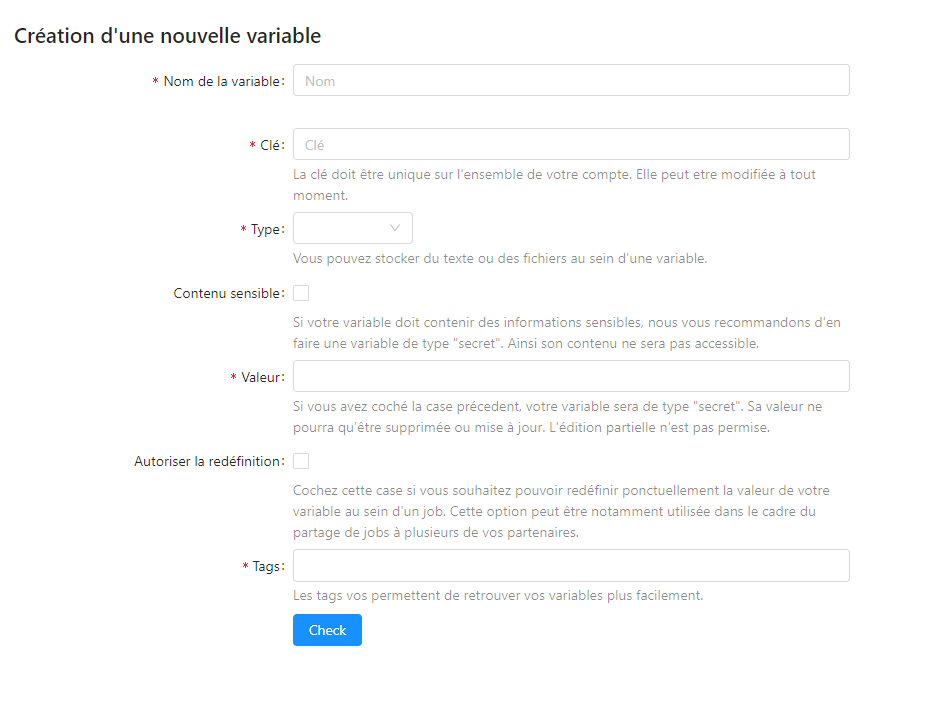
- The variable name is mandatory.
- The key is mandatory, it identifies the variable in a Data Factory job. Only lowercase alphabetic characters and the "_" character are allowed.
- The sensitive content option is used to transform the variable into a secret.
- A variable may have no value.
- This is particularly the case when a variable is intended to be systematically overloaded within a job
- The empty value `` for the overriding of a variable is not allowed.
Editing
The edit form looks like below:
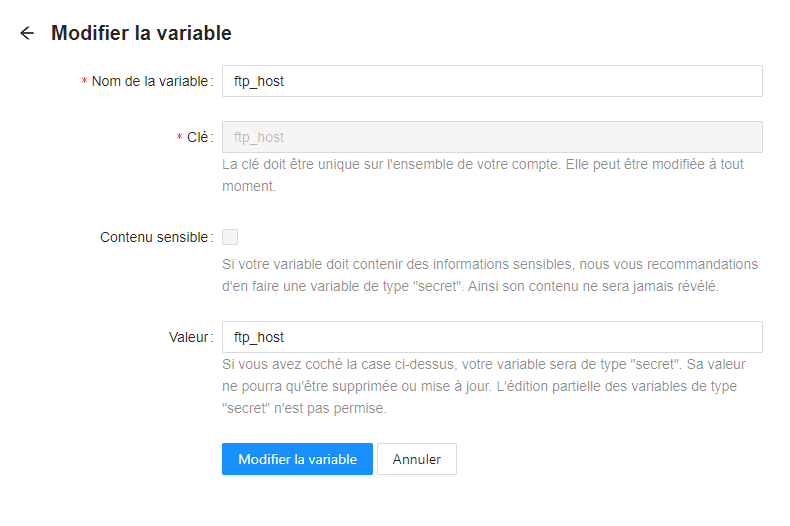
- The variable name, the key and the value are editable.
- the sensitive content option cannot be edited.
List variables
The list of account-wide variables is available in the settings.product-live.com interface at datafactory/variables/list
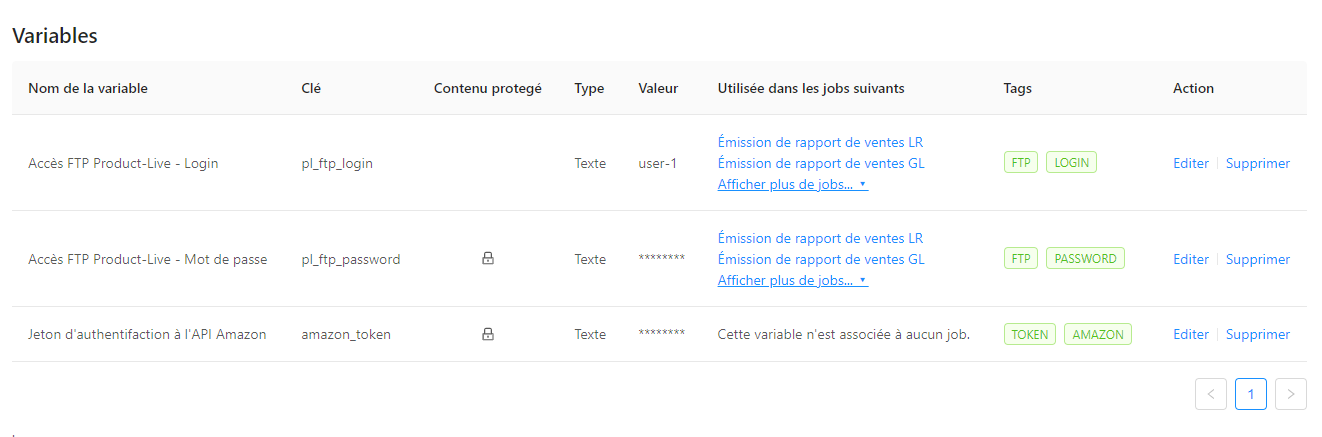 Some features presented above are not available to date.
Archiving
The archiving of a variable is done from the interface allowing to list the variables. Archiving is done after a confirmation request.
Overriding variables within a job
A variable can be overloaded locally in a job. A use case can be the following: we want to share a job with a partner, however, this one must enter his supplier code (or a password) so that it is valid and functional. In this case, a variable dedicated to this use (job_x_supplier_code) will be associated with the shared job and the receiver of the job will be asked to override this variable with the required value.
More information on the impact of overloading a variable below.
Details on retrieving variables when running a job
The diagram below describes the logic for retrieving a variable when it has been communicated to a given task.
flowchart TD
    start_process(Start)
    end_process(End)
    is_variable_available_for_this_job{"Does the variable<br /> exist <br />on the <br />owner account of the job? [1]"}
    does_account_have_set_new_value{"Has the value<br /> of this variable<br /> been overridden<br /> in this context?[2]"}
    return_surcharged_value[We use the overloaded value for this variable in this context]
    return_empty_value[We use an empty value for this variable]
    return_initial_value[On the default value for this variable]
    start_process --> is_variable_available_for_this_job
    is_variable_available_for_this_job -.-> | No, this variable does not exist or is not available | return_empty_value
    return_empty_value --> end_process
    is_variable_available_for_this_job -.-> | Yes | does_account_have_set_new_value
    does_account_have_set_new_value -.-> | Yes, the value of this variable has been overridden | return_surcharged_value
    does_account_have_set_new_value -.-> | No | return_initial_value
    return_surcharged_value --> end_process
    return_initial_value --> end_process
Notes:
- [1] The key of the target variable must strictly correspond to the key proposed in the job for a match to be made.
- [2] Note that here, we can place ourselves in the context of the account that owns the job (and therefore the variable), or in a shared context. Each account which receives a given job has the opportunity to override the variables which compose it (when this is specifically allowed).