Publication / Collect
WARNING
For now, publication/collect mechanisms are not available between tables that have more than one level.
Business context
There can be several uses related to the publication / collect mechanism:
Pre-referencing type of collect: the distributor only shares a data structure with his suppliers (only the structure without the products), the supplier creates and completes the products, he then publish them to his distributor. We talk about pre-referencing, because the product is first created in the supplier's systems, arrives without a distributor reference in the distributor account, and eventually is injected in the distributor information system to be associated with a reference (the distributor reference). There are two possible collect systems:
- Collect as suggestions: It means that the supplier's data do not overwrite the distributor's data without a manual validation by the distributor.
- Collect as replacement: It means that the supplier's data automatically overwrite the distributor's data
Enrichment type of collect: the distributor shares a data structure and products with its suppliers, we speak of enrichment, because in the product life cycle the products are first created on the distributor side, then shared with suppliers for enrichment.
Provision of content: this is the case when a supplier wishes to share content with a tierce party (a distributor for example). To the question "Why wouldn't it be the distributor who would share its structure as above?" The answer is the balance of power between supplier and distributor. For example the Beaumanoir group weights more than on billon of annual turnover. Many of the distributors weights less than them, so Beaumanoir does not want to spend time filling in data in the distributor format.
What is available in the current version of the platform?
Only the first use case is available in the current version of the platform.
Publication mechanism overview
flowchart TB
    S(Selection of products to publish by the user and launch of the job) ---> A
    subgraph J1- Data Factory Publishing Job
    A[A - Product export] ---> B[B - Product publication]
    end
    subgraph J2 - Data Factory Collect Job
    B -.-> C[C - Collect of products on the account that shares the table]
    end
C --> E[End of job]| # | Description |
|---|---|
| J1 | The publication job. This is shared by the distributor (the owner of the table) |
| J2 | The collect job. This is shared by the supplier (the account that shares the table) |
| A | The item export task (table-import-items) |
| B | The publication task (exchange-send-items) |
| C | The collect task (exchange-receive-items) |
app.product-live.com grid - distributor side (table owner)
Gray envelope
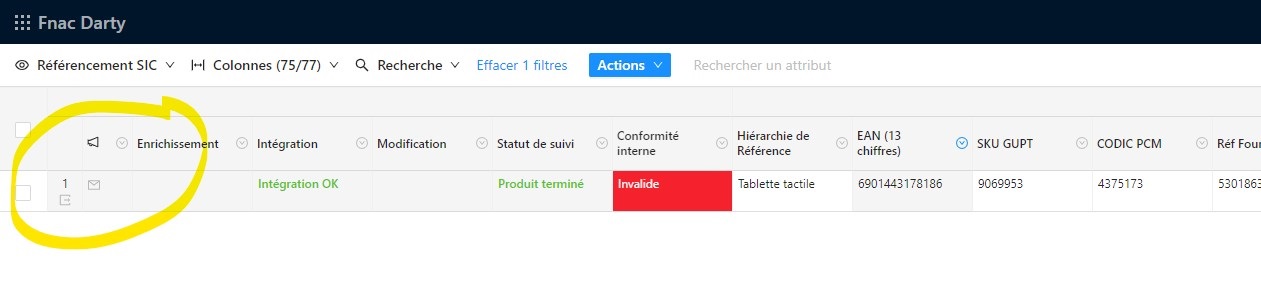
Above, the suggestion icon is gray. This means that we are in one of these cases:
- The product has not received any partner suggestions.
- The product did receive suggestions, but they were all marked as "read"
Blue envelope
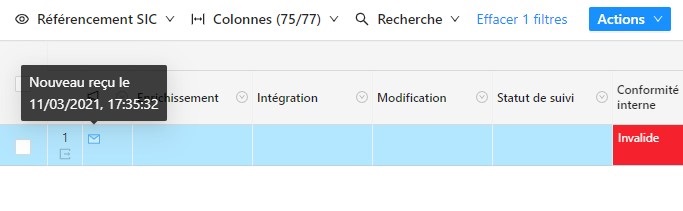
Above, the suggestion icon is blue. This means that all of the following conditions are met:
- A suggestion has been received for this product
- This suggestion resulted in the creation of this product (the product did not exist on the distributor's account before the suggestion was received)
- This suggestion has not been marked as "read"
The blue envelope (indicating the presence of a suggestion that led to the creation of the product) has priority over the orange envelope. That is to say that if a product has a suggestion that led to the creation of this product (blue icon) and a suggestion that simply led to an update proposal (orange icon), it is the blue icon that is displayed.
Orange envelope
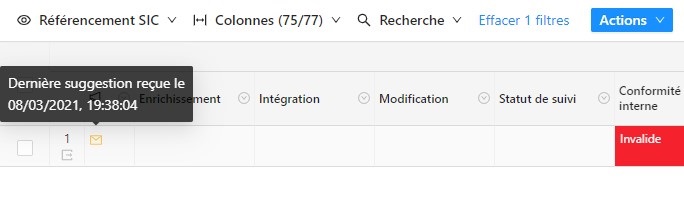
Above, the suggestion icon is orange. This means that all of the following conditions are met:
- A suggestion has been received for this product. At the time of receipt of this suggestion, the product already existed on the distributor's account.
- This suggestion has not been marked as "read"
The right side panel
More details on the various publications/suggestions are available by clicking on the icon shown above.

Warning
- Archived options and suffixes are not collected and are therefore not displayed in the suggestion
Details regarding the acceptation of a suggestion
- A product can receive several suggestions
- A suggestion contains a list of proposed changes on a list of field for the current item
- A change on a field may only be completly accepted or rejected. It's not permitted to accept only a part of a change. More details here.
app.product-live.com grid - supplier side (table shared to)
Gray send

Above, the gray publish icon indicates that the product has never been published.
Green send

A green icon indicates that the product has been published, and has not been modified since its last publication. Additional information is available on hover.
Orange send

An orange icon indicates that the product has been published, and has been modified since its last publication.
Red send

A red icon indicates that the item has been published but has not been successfully collected by the target partner.
In that case, the target partner does not see the suggestion if it is on an existing item, and does not see the new item if it is a creation.
Filter on sent suggestions
WARNING
The suggestion status management is currently in .
The filter "Last dispatch in error" is behind a feature flag update_erroneous_suggestion
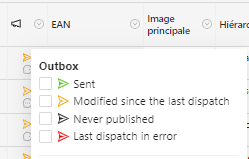
On the menu of the suggestion column, it si possible to filtre items depending on their suggestion status.
- Sent (green)
- All items that have their last suggestion successfully sent and received, and that have not changed since are filtered on the grid
- This filter can only be selected in addition to "Modified since last dispatch"
- Modified since last dispatch (orange)
- All items that have their last suggestion successfully sent and received, but have that changed since are filtered on the grid
- This filter can only be selected in addition to "Sent"
- Never published (gray)
- All items that never had a suggestion sent are filtered on the grid
- This filter cannot be selected in addition to another one
- Last dispatch in error (red)
- All items that have their last suggestion successfully sent but failed to be received are filtered on the grid
- This filter cannot be selected in addition to another one
Specifities on fields
Collect multiple-select fields
In the case of a multi-select field, it is not possible to accept only a part of the list of selected options. All suggested options are applied alltogether or all of them are rejected.
Pulish MULTIPLE-SELECT-QUANTIFIED
- Valid
Optionsare sent with thequantityvalue - Archived
Optionsare not sent. Therefore noquantityis sent either. - Empty
Optionsare not sent. Therefore noquantityis sent either.
Collect MULTIPLE-SELECT-QUANTIFIED
UPDATE mode
In update mode, fields Options on automatically added on recipient item field, with the associated quantity.
If an Option is already set on the recipient item field :
- If another
Optionis collected, thatOptionis added (with thequantity) to the field without removing otherOptions. - If the same
Optionis collected, thatOptionremains, and thequantityis updated.
SUGGEST mode
If there are different Option collected, or different quantity collected on existing Options, the user will see both Option and quantity in the field suggestion.
When the suggestion is applied, if an Option is already set on the recipient item field :
- If another
Optionis collected and applied, thatOptionis added (with thequantity) to the field without removing otherOptions. - If the same
Optionis applied, thatOptionremains, and thequantityis updated.
Publish NUMBERS with suffix
Numerical values are always published with the item.
- Valid
Suffixare sent with the numerical value - Archived
Suffixare not sent with the numerical value - Empty
Suffixare not sent with the numerical value
Collect NUMBERS with suffix
In the case of a number field with an attached suffix list, it is not possible to accept only a part of the suggested value: the number and the suffix must be accepted or rejected together.
UPDATE mode
In update mode, fields value is automatically applied on recipient item field.
- If a
Suffixis collected with the numerical value. ThatSuffixis automatically applied to the field in all cases. - If no
Suffixis collected with the numerical value. The defaultSuffixis applied if there is one, otherwise the value for the suffix is removed (if a value was present) for the current field.
SUGGEST mode
If there is a different value or Suffix collected, the user will see both in the field suggestion.
When the suggestion is applied :
- If a
Suffixis collected with the numerical value. Both are applied to the field. A user cannot choose to collect one but not the other. - If no
Suffixis attached with the numerical value:- The value is applied.
- The default
Suffixis applied if there is one, otherwise the value for the suffix is removed (if a value was present) for the current field.
When the suggestion is rejected :
- No value and no
Suffixare applied to the field.
Collect text fields
It is not possible to accept only a part of the text. All the suggested text is applied or rejected.