Authentication > Single Sign On
Introduction
Single Sign-On (SSO) is an authentication and authorization mechanism that enables users to access multiple applications or systems with a single set of login credentials, such as a username and password. SSO eliminates the need for users to remember and enter different usernames and passwords for different applications, reducing the risk of password fatigue and increasing security by minimizing the number of password-related vulnerabilities.
With SSO, once a user logs in to one application, they are automatically authenticated and authorized to access other applications that are integrated with the SSO system, without the need to re-enter login credentials. SSO is typically achieved through the use of an authentication protocol, such as Security Assertion Markup Language (SAML), OAuth, or OpenID Connect, which allows different applications to trust each other's authentication mechanisms.
Technical details
SSO capabilities are provided by the Keycloak identity and access management solution.
How to set it up for a given identity provider ?
1. Create a new identity provider
To create an IdP you need the following information:
- An
alias: It will be used as and id inside keycloak and will be present on oidc redirect url OpenID Connect metadata document: Given by the client, it generally ends up with.well-known/openid-configuration. It returns a JSON that contains all the information need by keycloak to configure the Idp.- A
clientId/clientSecret: Given by the client, these are the credentials that Keycloak will use again the client's IdP to validate the tokens.
 Menu: Configure > Identity providers; Click
 Add provider; Pick OpenID Connect v1.0
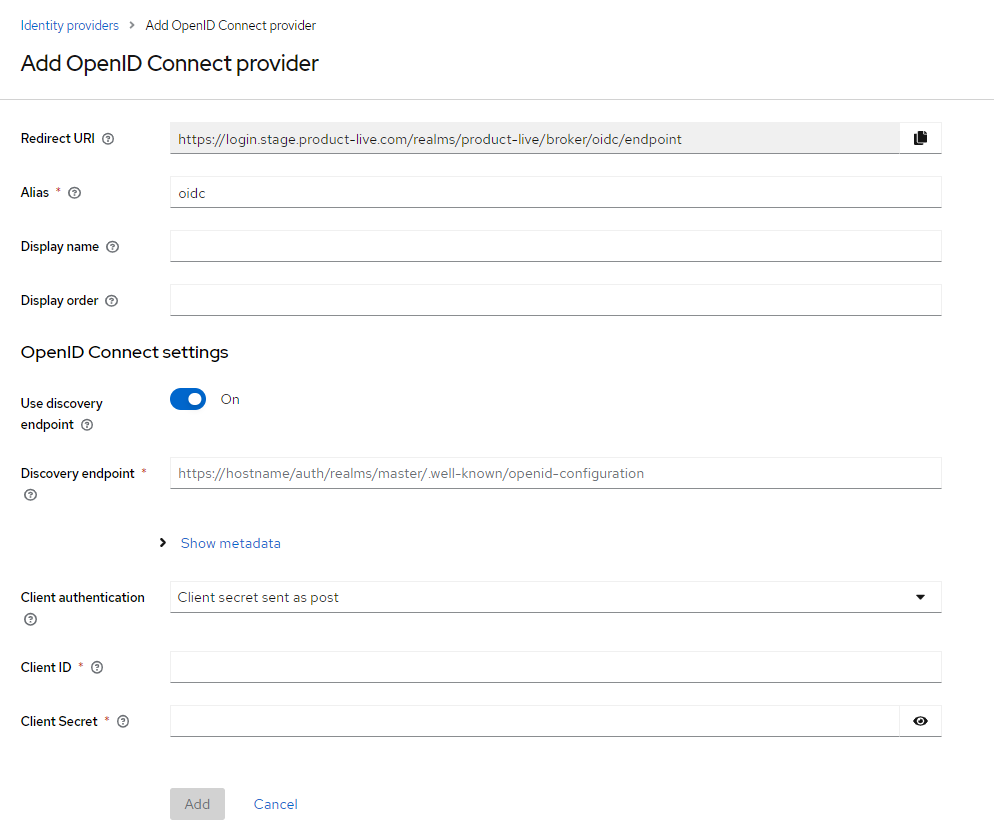 Input
Input alias, OpenID metadata document URL, clientId, and clientSecret; Click Add
Once created, you will need to communicate to the client 2 redirect URI. He needs them to configure and allows its IdP redirect on our Keycloak with tokens after login. Redirect URI have the following format, don't forget to replace the alias:
https://login.product-live.com/realms/product-live/broker/[alias of IdP]/endpointhttps://login.product-live.com/realms/product-live/protocol/openid-connect/loginIf asked, here is thefront-channel logout urlhttps://login.product-live.com/realms/product-live-admin/protocol/openid-connect/logout
2. Create a custom realm role
Context: To avoid altering an entity in keycloak, a realm role entity is used to store the mapping between emails and an idp alias in its attributes. The realm role has a hardcoded name hack_email_idp_mapper.
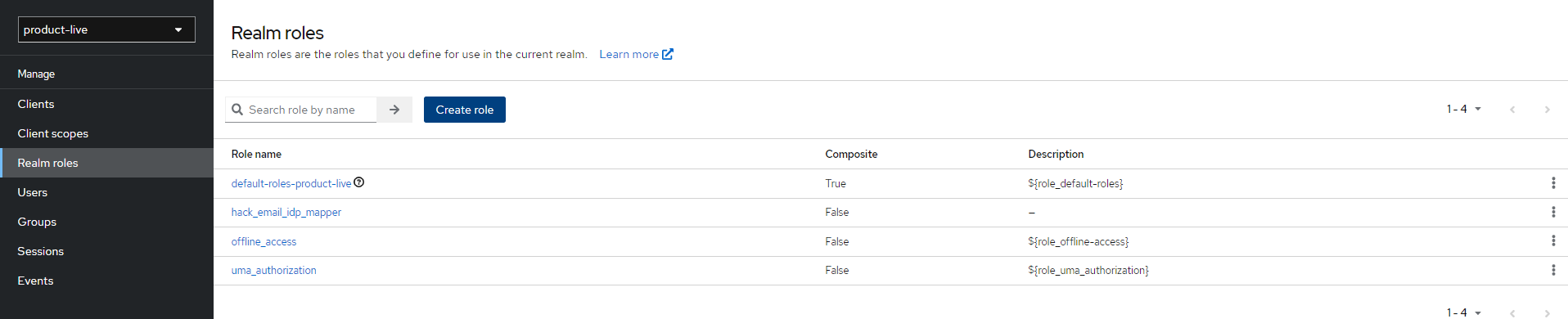 Menu: Manage > Realm roles; Click
 Create Role or Select the one created.
3. Associate a domain or a specific email address to the custom realm role
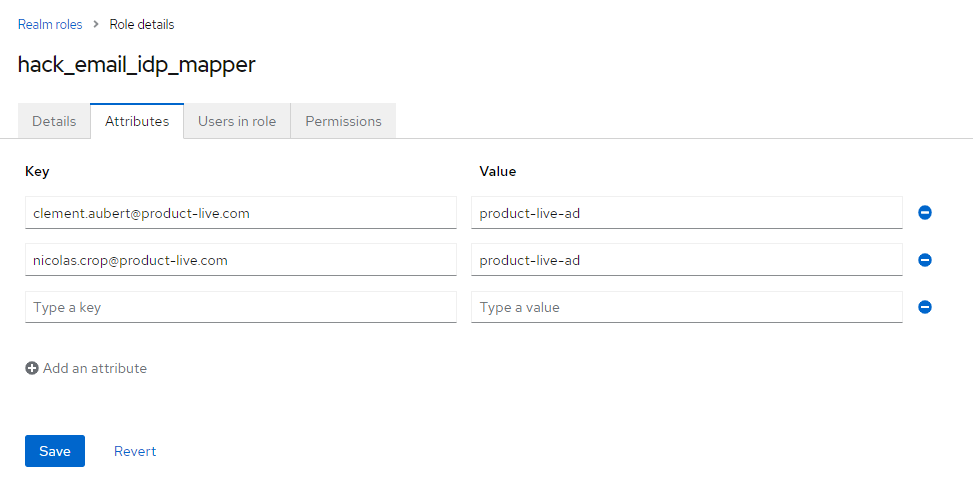 Tab: Attributes;
 Key can be a complete email, or a domain. Value is the alias of the IdP
The following logic is implemented:
flowchart LR
    A[Start]
    A --> B{Realm Role hack_email_idp_mapper exists?}
    B -->|Yes| C{Realm Role has an attribute key with the user's email?}
    C -->|Yes| D{Attribute value contains an IdP Alias that exists?}
    D -->|Yes| E[User is linked to an IdP. Password setup/reset will be disabled. User will be redirect on this linked IdP during login flow.]
    F -->|Yes| D
    B -->|No| G[User is not linked to an IdP. Loging Flow will continue with password prompt and OTP.]
    C -->|No| F{Realm Role has an attribute key with the domain of user's email?}
    D -->|No| G
    E --> Z
    F --> Z
    G --> Z[End]
User authentication flow
On first login
Keycloak provides for each Identity Provider 2 flows.
first login flow: Term 'First Login' means that no Keycloak account is currently linked to the authenticated identity provider account.post login flow
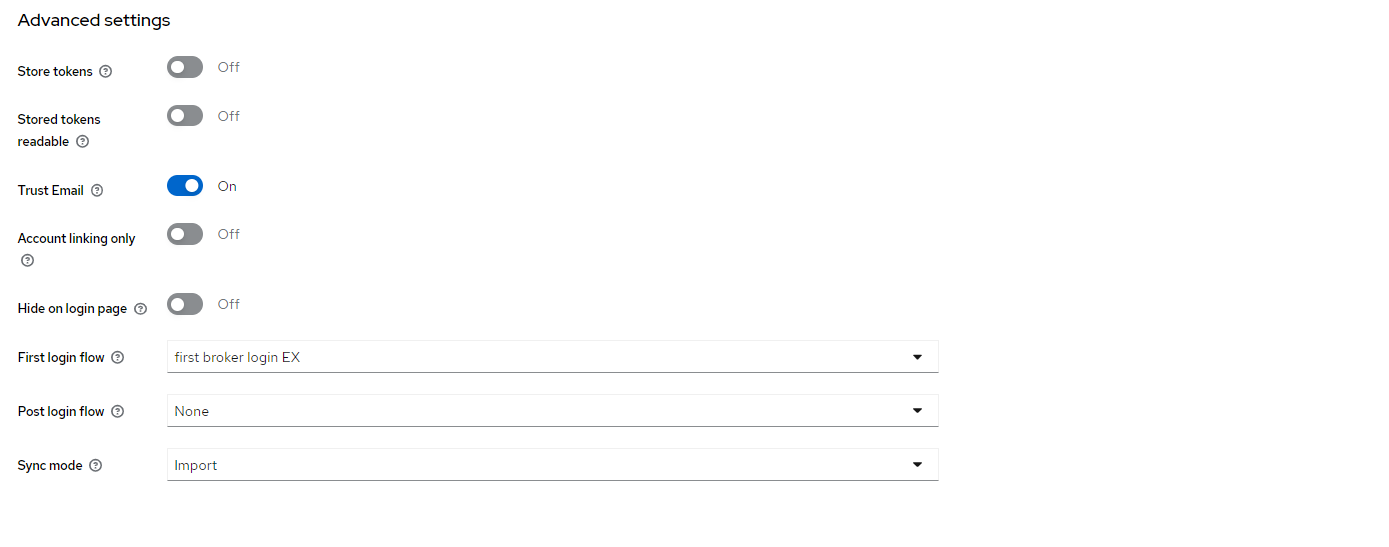 Menu: Configure > Identity providers; Select Provider; Anchor
 Advanced Settings
In the built-in flow, Keycloak automatically associate first broker login authentication flow.
- Review Profile
- Create User if Not Exists
- If User already exists, we need to confirm ownership with one of the following options
- Verify mail
- Verify password
- Verify OTP
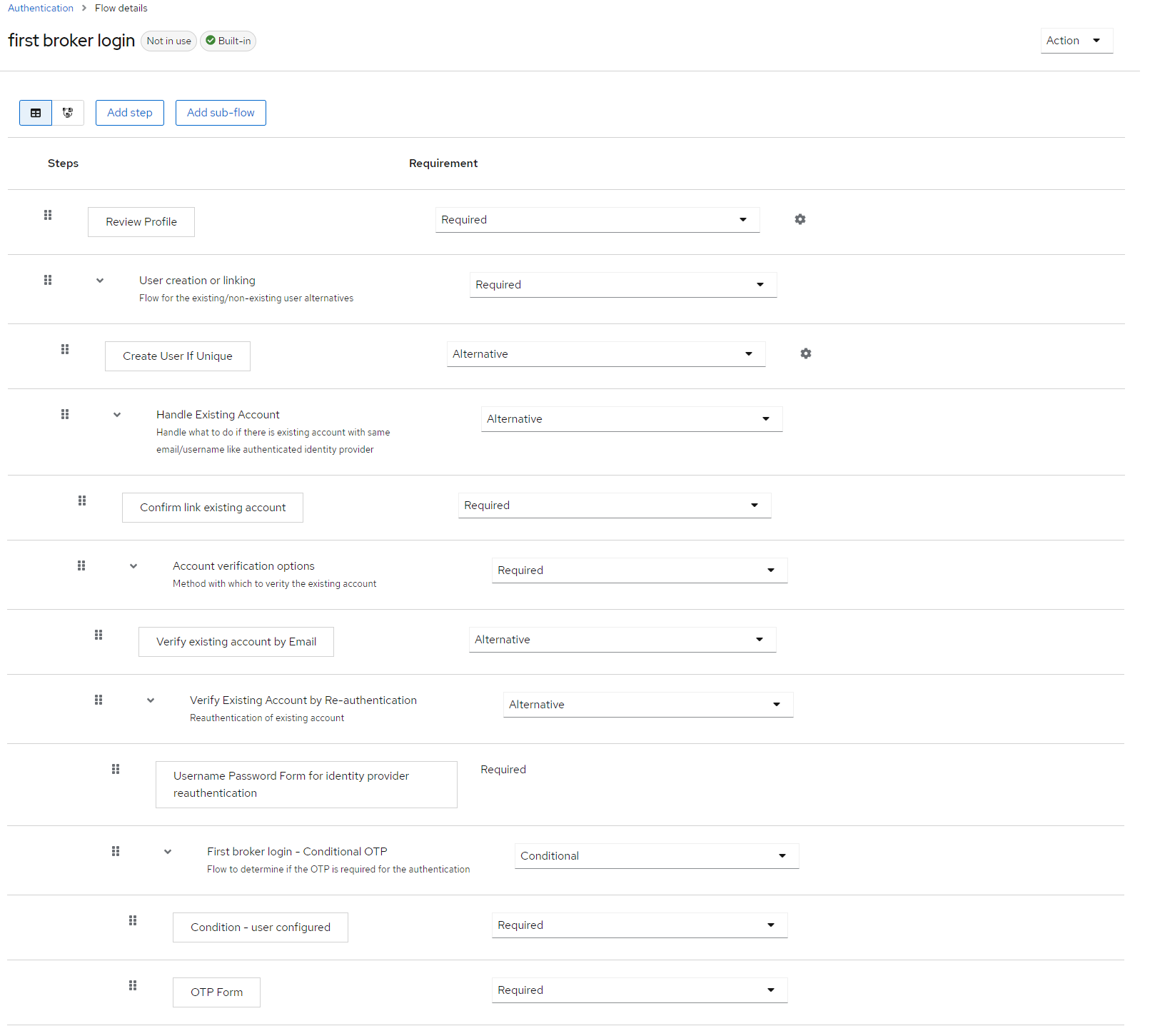
For the need of Product-Live a new flow has been created with the following logic first broker login EX:
- Create User if Not Exists
- Verify email
When the user already exists the flow request the user to check his email to validate ownership on the account:
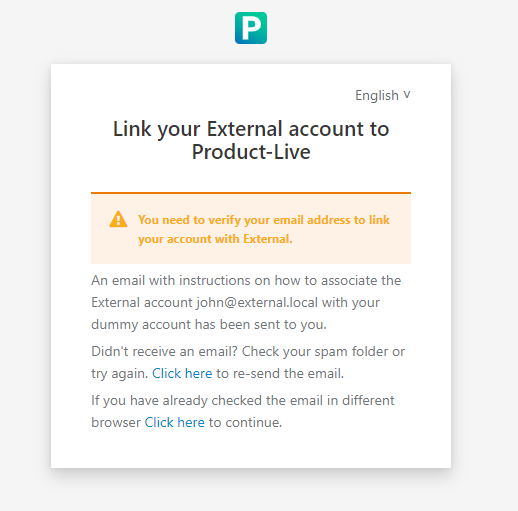
FR Titre: Lier votre compte {IDP} à Product-Live
Un courriel avec des instructions pour associer le compte {email} sur {IDP} avec votre compte Product-Live vous a été envoyé.

Vous n'avez pas reçu de courriel ? Vérifiez votre dossier spam ou réessayez. Cliquez ici pour renvoyer le courriel.

Si vous avez deja vérifié votre couriel dans un autre navigateur, cliquez ici pour continuerEN Titre: Link your {IDP} account to Product-Live
An email with instructions on how to associate the {email} account {IDP} with your Product-Live account has been sent to you.

Didn't receive an email? Check your spam folder or try again. Click here to resend the email.

If you have already checked your email in another browser, click here to continueDE Titre: Verknüpfen Sie Ihr {IDP} Konto mit Product-Live
Eine E-Mail mit weiteren Anweisungen um {email} Konto {IDP} mit Ihrem Product-Live Konto zu verknüpfen wurde an Sie versendet.

Sie haben keine E-Mail erhalten? Überprüfen Sie Ihren Spam-Ordner oder versuchen Sie es erneut. Klicken Sie hier, um die E-Mail erneut zu senden.

Wenn Sie Ihre E-Mail bereits in einem anderen Browser überprüft haben, klicken Sie hier, um fortzufahren.The email received has the following content
FR Titre: Lier votre compte {IDP} à Product-Live
Une demande a été faite pour lier votre compte Product-Live avec le compte {IDP} de l'utilisateur {email}.
Si vous êtes à l'origine de cette demande, veuillez cliquer sur le lien ci-dessous pour relier ces comptes :

Confirmer le lien entre les comptes {IDP} et Product-Live

Ce lien expire dans {}.
Si vous n'êtes pas à l'origine de cette demande, vous pouvez ignorer ce message.

-- L'équipe Product-LiveEN Titre: Link your {IDP} account to Product-Live
A request has been made to link your Product-Live account with {IDP} account of user {email}.
If you are the originator of this request, please click on the link below to link these accounts:

Confirm the link between the {IDP} and Product-Live accounts

This link will expire within {}.
If you did not initiate this request, you can ignore this message.

-- The Product-Live teamDE Titre: Verknüpfen Sie Ihr {IDP} Konto mit Product-Live
Es wurde eine Anfrage gestellt, Ihr "Product-Live-Konto" mit dem "{IDP}-Konto" von Benutzer {email} zu verknüpfen.
Wenn Sie der Urheber dieser Anfrage sind, klicken Sie bitte auf den unten stehenden Link, um diese Konten zu verknüpfen:

Bestätigen Sie die Verbindung zwischen den Konten {IDP} und Product-Live

Dieser Link läuft in {} ab.
Wenn Sie diese Anfrage nicht initiiert haben, können Sie diese Meldung ignorieren.

-- The Product-Live teamOn subsequent logins
If user already exists in Keycloak, login will be seamless.