User Management
TIP
This documentation is dedicated to the user management capabilities inside the Product-Live platform. It is not related to the authentication process. For more information about the authentication process, please refer to the Authentication documentation.
settings.product-live.com application
User Management
From the "Settings" portal account administrators can manage their users. It is possible to:
- List all users
- Edit users
- Send invitations
List all users
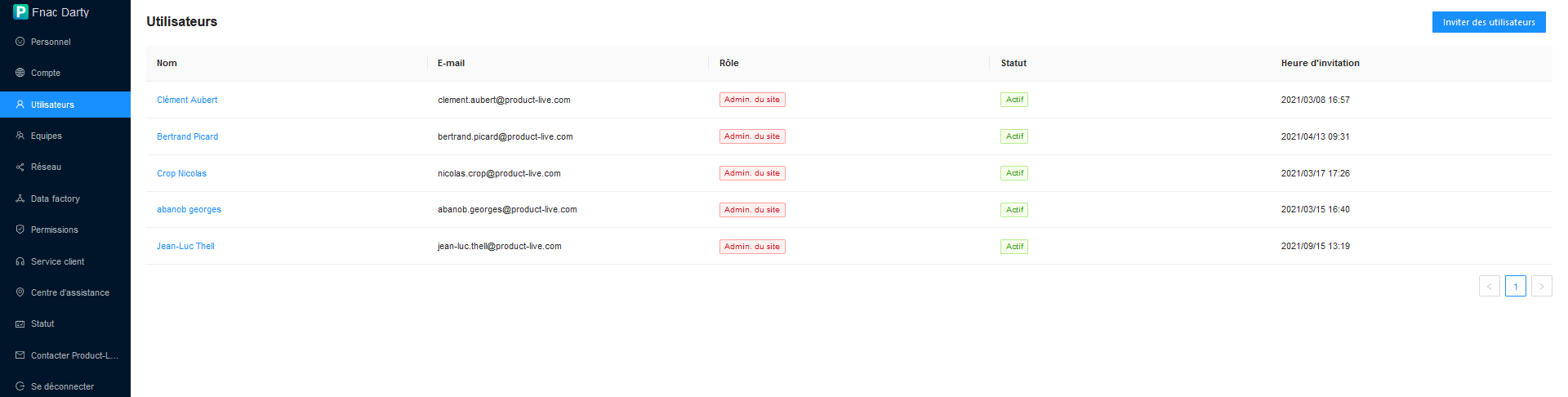
On the user management interface, administrators have the option to see:
- Name and surname of the user
- Email address
- Their role on the account
- Site Admin or Editor
- User status
- Active, Suspended, Archived, Removed or Pending
- The date and time the invitation was sent
Edit users
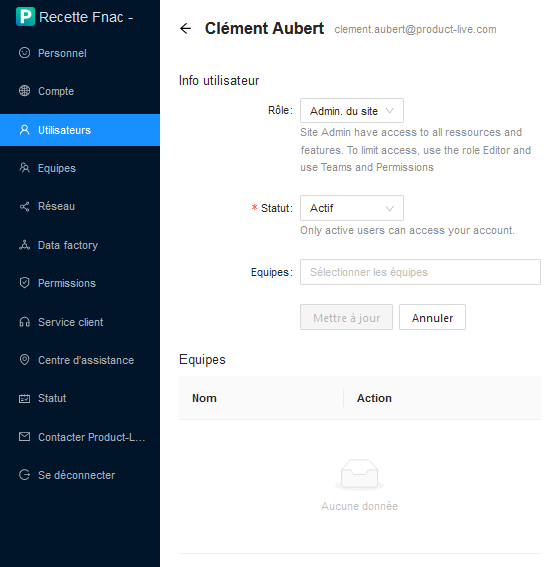
By clicking on a user, the administrator has the possibility to:
- To change
- The role of the user on the account
- The status of the user on the account
- Assign/unassign the user to one or more teams on the account
Send invitations
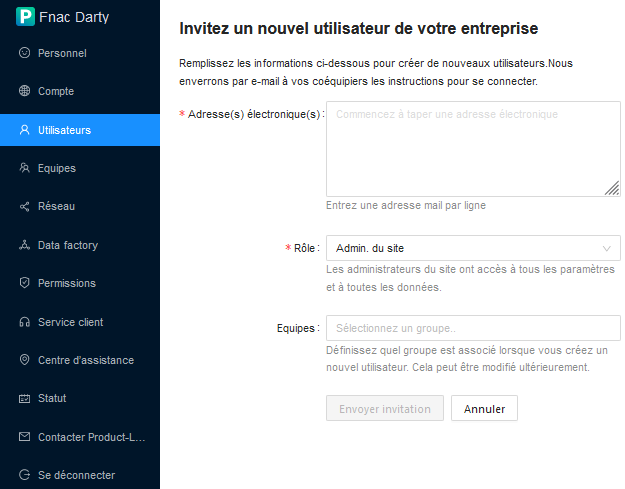
The administrator can invite new users to his account using the "Invite users" button on the user management screen.
In the new user invitation form the administrator must enter:
- The email address(es) of the users to invite (one address per line)
- The role new users will have: Site administrator or Editor
- The team(s) the users will belong to
WARNING
There is no limit regarding the number of users that can be invited at the same time. Requests with large numbers of email may to take a long time to process as every email are processed one by one.
When a list of users is invited, they are processed one by one as follows:
flowchart TD
    _start_("Start")
    _end_("End")
    for_each_email("For each email")
    user_already_has_a_profile{"Does a profile already<br /> exists for this email <br />on the current account? [1]"}
    message_user_already_exists("Add to the list of messages to display,<br /> a message of type info,<br /> 'A user with the email X already exists'")
    message_quota_is_reached("Add to the list of messages to display,<br /> a message of type error,<br /> 'You have reached the user limit<br /> with role X on your account'")
    quota_is_reached{"Does the quota is reached? [2]"}
    domain_is_handled_by_external_idp{"Does the domain associated <br />with the given email is <br />handled by an external IDP? [3]"}
    create_profile_and_send_idp_email("A profile is created, and a mail is sent to the user [4]")
    create_profile_and_send_email("A profile is created, and a mail is sent to the user [5]")
    display_message_to_user("We display to the user, all the messages previously collected")
    does_the_user_alread_has_a_pl_account{"Does a profile exists inside<br /> the Product-Live platform<br /> with the given email?"}
    send_welcome_email("Attach profile to current account <br />and send a welcome email [6]")
    _start_ --> for_each_email
    for_each_email --> user_already_has_a_profile
    user_already_has_a_profile -- Yes --> message_user_already_exists
    message_user_already_exists --> end_for_each_email
    end_for_each_email --> for_each_email
    user_already_has_a_profile -- No --> quota_is_reached
    quota_is_reached -- Yes --> message_quota_is_reached
    message_quota_is_reached --> end_for_each_email
    quota_is_reached -- No -->  does_the_user_alread_has_a_pl_account
    does_the_user_alread_has_a_pl_account -- "No" --> domain_is_handled_by_external_idp
    does_the_user_alread_has_a_pl_account -- "Yes" --> send_welcome_email
    domain_is_handled_by_external_idp -- Yes --> create_profile_and_send_idp_email
    create_profile_and_send_idp_email --> end_for_each_email
    domain_is_handled_by_external_idp -- No --> create_profile_and_send_email
    create_profile_and_send_email --> end_for_each_email
    end_for_each_email --> display_message_to_user
    send_welcome_email --> end_for_each_email
display_message_to_user --> _end_- [1] We applied a "to lower case" transformation on the email address before checking if a profile already exists for this email on the current account. (as the emails are stored in lowercase in the database). Also we check if the profile already exists on the current account, regardless of the status of the profile.
- [2] The quota is defined by user role (exemple: 5 users with the role
SITE_ADMINand 10 users with the roleEDITOR). Only users in "Active" and "Pending" status are counted in the calculation of the number of users within the current account. The user with the statut "Suspended", "Archived" or "Removed" are not counted in the calculation of the number of users within the current account. - [3] A domain may be handled by an external identity provider (IDP). For example, the domain
@product-live.comis managed by our active directory. If a user has an email address on this domain, he can (and has to) log in to the Product-Live platform using his Microsoft email address and password. - [4] The email sent to the user is detailed below. From a technical point of view, if a profile already exists with this email, we simply attach it to the current account.
- [5] The email sent to the user is detailed below. From a technical point of view, if a profile already exists with this email, we simply attach it to the current account.
- [6] The email sent to the user is detailed below.
Known Limitations
The user must log in at least once after completing the account creation form for the account creation to be completed. Otherwise, the account status will remain in "In Progress".
More details regarding the case where the email provided is managed by a third-party Identity Provider
TIP
SSO managed domains are domains that are managed by a third party. For example, the domain @product-live.com is managed by our active directory. If a user has an email address on this domain, he can (and has to) log in to the Product-Live platform using his Microsoft email address and password.
- An email is sent to the user inviting him to finalize his account creation
- A user profile is automatically created for the user (with an
IN_PROGRESSstatus) - As the authentication process is managed by the SSO, the user does not set a password
- At no time can the user update their password or request access to a reset form. If the domain to which the User's email belongs is associated with a domain managed by a third-party Identity Provider, authentication can only be done through that Identity Provider.
- However, at the first connection, the user is asked to accept the general conditions of use.
- The user's first and last name are retrieved from the token generated by the external IDP and entered into our systems when the user first logs in
Mail sent to the user
Hello,

You have been invited to join Product-Live. Product-Live is a web-based application that helps brands and retailers to connect in order to get the best product information for customers. You can create, manage and share your product catalog, and everything is now ready to get started. Click the link below to connect to Product-Live.

Click here to finalize your account creation,


— The Product-Live team

Bonjour,

Vous avez été invité à rejoindre Product-Live. Product Live est une application web qui aide les fournisseurs et les distributeurs à se connecter afin d'obtenir les meilleures informations produits pour les clients. Vous pouvez créer, gérer et partager votre catalogue produits. Cliquez sur le lien ci-dessous pour vous connecter à Product-Live.

Cliquez ici pour finaliser la création de votre compte,

L'équipe Product-LiveMore details regarding the case where the email provided is managed by the Product-Live platform
- An email is sent to the user inviting them to create an account on the Product-Live platform
- The email contains a link to the account creation page
- When the user clicks on the link, they are redirected to the account creation page
- The user must enter their name and password
Mail sent to the user
Hello clement.aubert+22_03@product-live.com,

An account on Product-Live has been created for you. Product-Live is a web-based application that helps brands and retailers to connect in order to get the best product information for customers. You can create, manage and share your product catalog, and everything is now ready to get started. Click the link below to connect to Product-Live.

Click here to set your password.

This link expires in 7 days.

- The Product-Live team


Bonjour clement.aubert+22_03@product-live.com,

Un compte sur Product-Live a été créé pour vous. Product Live est une application web qui aide les fournisseurs et les distributeurs à se connecter afin d'obtenir les meilleurs informations produits pour les clients. Vous pouvez créer, gérer et partager votre catalogue produits. Cliquez sur le lien ci-dessous pour vous connecter à Product-Live et créer votre profil utilisateur.

Cliquez ici pour définir votre mot de passe.

Ce lien expire dans 7 jours.

— L'équipe Product-LiveComplete process
flowchart TD
    start_process(Start - user click on the invitation link he received)
    subgraph First screen
    fill_form("User accept the terms and conditions <br />and provide its name, first name, password, phone number and language preference.")
    user_submit("The user submits his information successfully.")
    end
    user_connected{"the user is already <br />connected to another account <br />(with another email)"}
    subgraph Login screen
    redirect_login("The user is asked to enter his credentials [1]")
    end
    subgraph app.product-live.com
    redirect_app("The user is redirected to the app.product-Live.com application" )
    end
    subgraph Second screen
    ask_user("The user is asked whether he wants to log on <br />to his newly created profile or continue <br />to the profile he is currently logged on.")
    end
    user_logout("The user is logged out")
    start_process --> fill_form
    fill_form --> user_submit
    user_submit --> user_connected
    user_connected -- "no" --> redirect_login
    redirect_login --> redirect_app
    user_connected -- "yes" --> ask_user
    ask_user -- "Continue to the newly created profile" --> user_logout
    user_logout --> redirect_login
    ask_user -- "continue to the already logged profile" --> redirect_app
[1]: From a technical standpoint, the web application will activate the user profile during its first connection. Before this activation, the user profile remained in the "In Progress" status.
When the user already has an account
If the user already has an account, when he receives a new invitation by a new partner to join Product-Live, the email:
- Introduces them which company and who invited them to join them on Product-Live
- Introduces them to Product-Live and its benefits
- Invites them to log in
Mail sent to the user
Hello clement.aubert+22_03@product-live.com,

You have been invited to join the [Account name] account.

Click here to login.

- The Product-Live team


Bonjour clement.aubert+22_03@product-live.com,

Vous avez été invité à rejoindre le compte [Account name].

Cliquez ici pour vous connecter.

— L'équipe Product-Liveadmin.product-live.com application
User administration
From the "Admin" portal, Product-Live administrators can manage users. It is possible to:
- List all users
- Deactivate users
WARNING
Since the 2023-03-23 update, the user creation interface has been removed from the "Admin" portal. It is no longer possible to create users from this portal.
List all users
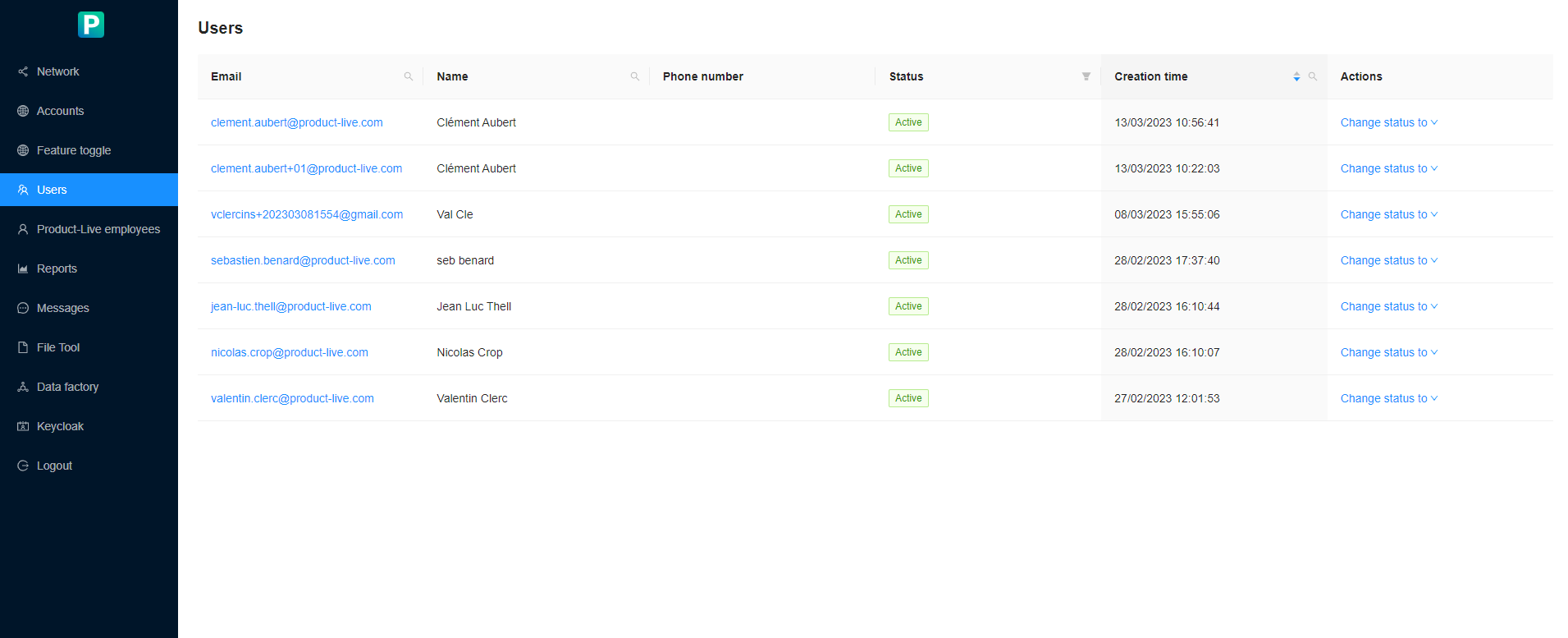
On the user administration interface, administrators have the option to see:
- Users email address
- Their first and last name
- Their phone number
- Their status
By clicking on a user, the administrator has the possibility to see:
- The account(s) the user has access to
- User status
- The role of the user
- Editor
- Administrator
