Pipelines
Pipelines in Data Factory are execution stacks in which jobs run. The pipelines available today on the platform meet the following rules:
- A single job can run on a pipeline at a time
- The job scheduling strategy is First In First Out (without preamp) That is to say that it is the first job launched which has priority over the following ones (first come, first served). Scheduling is cooperative (no preemption), meaning that for the next job to start, the previous job must end, no matter how long it takes.
- If a job in progress is cancelled, it releases the pipeline and it can run a job again
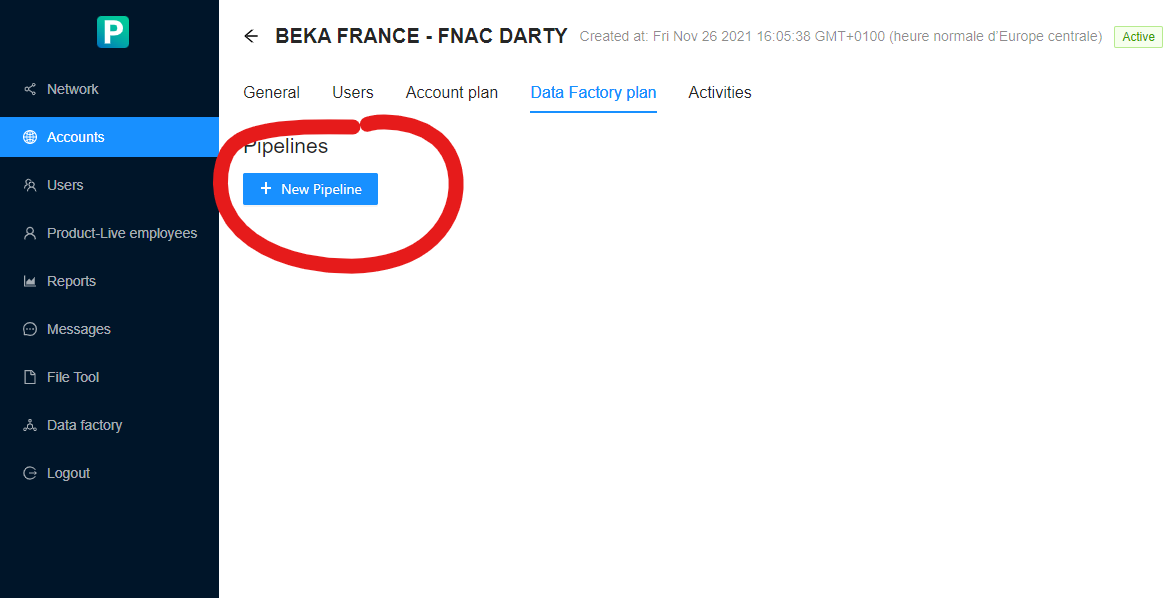
Creating and updating pipelines
The creation and update is done from the Product-Live administration interface, from the detail view of an account.
More details on job execution scheduling within a pipeline
When starting a user job
flowchart TD
    end_process(End)
    when_job_is_launched((Event: <br />Launching a job))
    job_has_pipeline{Is the job<br /> associated with<br /> a pipeline?}
    is_pipeline_available{Is the pipeline available?}
    execute_job[Execute Job]
    job_put_on_hold[Hold job <br /> Job is placed in pipeline stack]
    job_launch_error[The job cannot be launched<br />an error is reported to the user]
    when_job_is_launched --> job_has_pipeline
    job_has_pipeline -- Yes --> is_pipeline_available
    job_has_pipeline -- No --> job_launch_error
    is_pipeline_available -- Yes --> execute_job
    is_pipeline_available -- No --> job_put_on_hold
    job_launch_error --> end_process
    execute_job --> end_process
    job_put_on_hold --> end_process
    classDef green fill:#9f6,stroke:#333,stroke-width:2px;
    class when_job_is_launched green
WARNING
In the case of a shared job, the job is still launched within the pipeline associated with this job.
At the end of the execution of a job
flowchart TD
  end_process(End)
  when_job_is_done((Event: <br />End of job execution))
  is_pipeline_stack_enpty{Is the pipeline<br /> runtime stack empty?}
  select_older_job[Select oldest <br />job on this stack]
  start_job[Launching the selected job]
  when_job_is_done --> is_pipeline_stack_enpty
  is_pipeline_stack_enpty -- Yes --> end_process
  is_pipeline_stack_enpty -- No --> select_older_job
  select_older_job --> start_job
  start_job --> end_process
  classDef green fill:#9f6,stroke:#333,stroke-width:2px;
  class when_job_is_done green
When starting a system job
As a reminder, the term system job refers to jobs directly integrated into the platform, and which therefore do not need to be created by users in order to be used. These jobs are therefore not associated with any pipeline.
flowchart TD
  end_process(End)
  when_job_is_launched((Event: <br />Launching a system job))
  account_has_pipeline{Does the account associated<br /> with the current table have <br />one or more pipelines?}
  select_pipeline_and_put_job_on_hold["Selecting a pipeline - <b>the first in alphabetical order</b><br /> within the account that owns the current table<br />Adding the execution of the system job to the stack of this job [1]"]
  execute_on_mutualized_stack["Execution of the job in the stack mutualized to all accounts [2]"]
  when_job_is_launched --> account_has_pipeline
  account_has_pipeline -- Yes --> select_pipeline_and_put_job_on_hold
  select_pipeline_and_put_job_on_hold --> end_process
  account_has_pipeline -- No --> execute_on_mutualized_stack
  execute_on_mutualized_stack --> end_process
  classDef green fill:#9f6,stroke:#333,stroke-width:2px;
  class when_job_is_launched green
Notes:
- [1] If the system job is executed from the context of a shared table, it executes on the first pipeline in alphabetical order, of the account that owns the table.
- [2] The shared pipeline is unique within the Data Factory platform. It is common to all accounts.
Warning
The pipelines considered for the execution of a system job are always the pipelines associated with the account to which the current table is associated. Since system jobs can only be launched from the app.product-live.com application, a table is systematically selected when launching such a job.
Notes on the shared pipeline:
- It behaves like a classic pipeline. As soon as the execution of a job comes to an end, the next one is executed.
- Like a classic pipeline, it only allows the execution of a single job simultaneously
From app.product-live.com
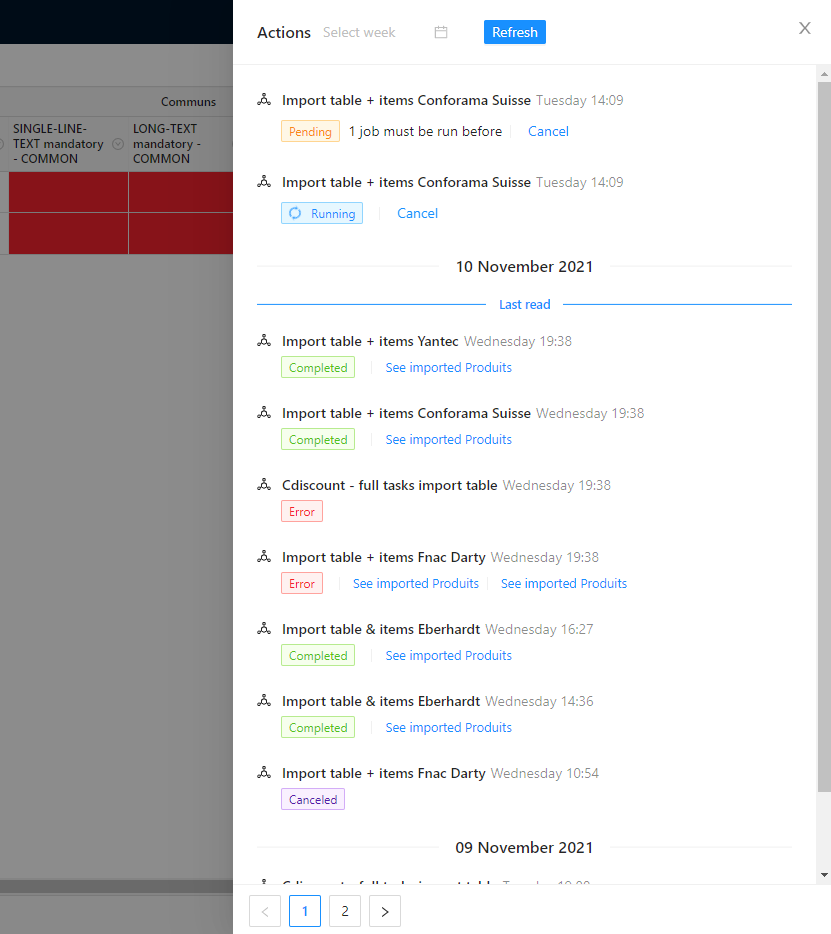
From the application app.product-live.com, if a job is waiting to be executed, we display to the user the number of jobs that must be executed before the target job can be executed.
From settings.product-live.com
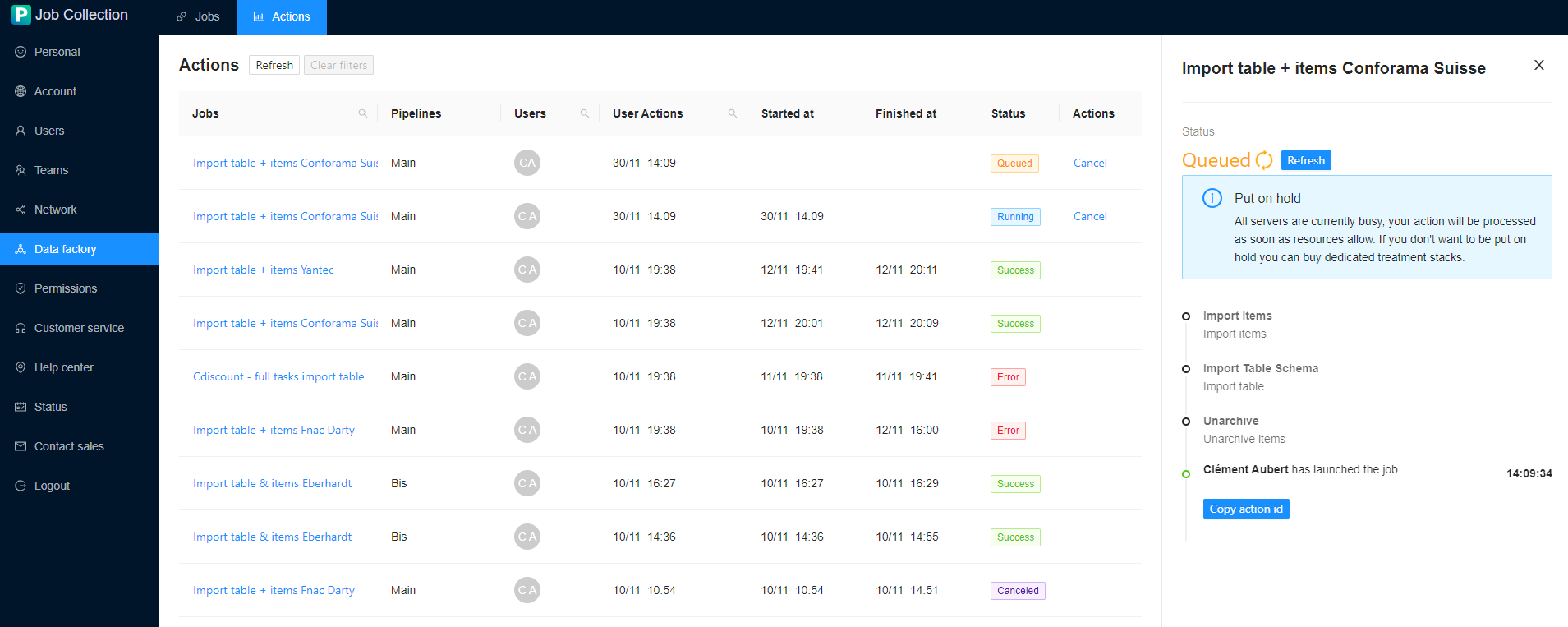
From the settings.product-live.com application, if a job is waiting to be executed, the following message is displayed to the user.
Known limitations
- Pipelines theoretically guarantee the immediate execution of a job when the pipeline to which it is attached is free. However, technical work must be done to actually guarantee this behavior. A short delay of a few seconds may be experienced when launching a job.
- In case of massive and unusual use of Data Factory by platform users, slowdowns (or delayed starts) may be observed in production