Jobs
Definition
Job creation and update
There is two ways to create or update a job:
- Using a zip file containing the job definition and assets (recommended)
- Using the public API
Create or update job using the public API
More information here
Create or update job using a zip file
Structure of the zip file
A Job is a zip file containing these files and folders:
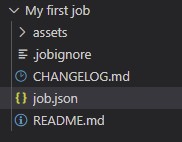 .
.
| File/Folder | Description |
|---|---|
| assets | A folder that will contain all the files used for your job (xslt, templates...) |
| assets/TESTS | A folder containing only the test files (for example when you need to test an xslt file with an input xml file) |
| .jobignore | A file defining the files that must not be imported when the job is executed |
| CHANGELOG.md | A markdown file where you should log every updates of your job |
| job.json | A json file defining tasks that must be executed |
| README.md | A markdown file where you should write about your job from a business point of view |
job.json
{
    "schema": "1.0",
    "key": "unique-job-key-in-your-account",
    "title": "My job title",
    "tasks": [],
}| Property | Description |
|---|---|
| schema | Required - Set 1.0 |
| key | Required - The unique key name of your job in your account |
| title | Required - The name that will be displayed to users |
| tasks | Required - An array of tasks |
{
    "schema": "1.0",
    "key": "unique-job-key-in-your-account",
    "title": "My job title",
    "icon": "file-add",
    "titleLocal": {
        "fra": "Le titre de mon job"
    },
    "description": "Description of the job",
    "descriptionLocal": {
        "fra": "La description du job"
    },
    "userInputs": [],
    "tasks": [],
    "outputParameters": {}
}| Property | Description |
|---|---|
| schema | Required - Set 1.0 |
| key | Required - The unique key name of your job in your account |
| title | Required - The name that will be displayed to users |
| icon | optional ENUM: the icon that will be displayed to users. Use the autocomplete in the vscode extension to get the full list |
| titleLocal | optional An object for localization |
| description | optional The description of the job |
| descriptionLocal | optional An object for localization |
| userInputs | optional A form of inputs that will be displayed to users |
| tasks | Required - An array of tasks |
| outputParameters | optional Outputs that will be visible or downloadable from users |
Tasks
A task is a specific action, like getting files on a FTP, generate an .xlsx file... Each task has:
- Its own json representation.
- Input parameters
- Outputs.
More information regarding "specific" tasks created on specific account
Using the Product-Live API, it is possible to create a task that will be available only for a specific account. It is the responsibility of the user who created the task to manage the run of the task (the execution of the task is not managed by Product-Live).
Those tasks may be referenced inside a job using the following notation:
- using directly the account key of the account that created the task. In the example below, the account key is
696e7c81-c7ca-477f-9929-f4dc10bb7f8a
{
    "name": "696e7c81-c7ca-477f-9929-f4dc10bb7f8a/the_task_key_of_my_task",
    "taskReferenceName": "my_task",
    "description": "My task",
    "optional": false,
    "type": "SUB_WORKFLOW",
    "input": {
        "term1": 1,
        "term2": 2
    }
}- using the shortcut
${accountKey}that will be replaced when saving the job by the account key of the account that created the job.
{
    "name": "${accountKey}/the_task_key_of_my_task",
    "taskReferenceName": "my_task",
    "description": "My task",
    "optional": false,
    "type": "SUB_WORKFLOW",
    "input": {
        "term1": 1,
        "term2": 2
    }
}note: the variable accountKey is only made available for this purpose. It is not possible to use it in other places.
User inputs
User inputs allow displaying a form to a user when he executes a job. To add a user input use the autocompletion: use Ctrl + Space or start typing user after the title property.

There are three types of user inputs.
User input: TEXT
json
{
  "key": "catalog_name",
  "title": "Catalog name",
  "description": "The catalog name on the cover page",
  "required": true,
  "type": "TEXT",
  "default": "New catalog"
}definition
| Property | Description |
|---|---|
| key | Required - A unique key in the job user inputs |
| title | Required - The title displayed to the user |
| titleLocal | optional The localization of the title |
| description | optional The description displayed to the user |
| descriptionLocal | optional The localization of the description |
| required | Required - true|false defines if the field is mandatory |
| type | Required - Must be TEXT |
| default | optional The default value |
{
  "key": "catalog_name",
  "title": "Catalog name",
  "titleLocal": {
    "fra": "Nom du catalogue"
  },
  "description": "The catalog name on the cover page",
  "descriptionLocal": {
    "fra": "Le nom du catalogue affiché sur la page de garde"
  },
  "required": true,
  "type": "TEXT",
  "default": "New catalog"
}User input: SELECT
json
{
  "key": "export_language",
  "title": "Select language",
  "description": "Select the language of the exported catalog",
  "required": true,
  "mode":"SINGLE",
  "type": "SELECT",
  "options": [
    {
      "key": "fra",
      "title": "French"
    },
    {
      "key": "spa",
      "title": "Spanish"
    }
  ],
  "default": "fra"
}definition
| Property | Description |
|---|---|
| key | Required - A unique key in the job user inputs |
| title | Required - The title displayed to the user |
| titleLocal | optional The localization of the title |
| description | optional The description displayed to the user |
| descriptionLocal | optional The localization of the description |
| required | Required - true | false defines if the field is mandatory |
| mode | optional Defines the number of options selectable. Must be SINGLE (default) | MULTIPLE |
| type | Required - Must be SELECT |
| options | Required - An array of options with key/title values Each option key must be unique within the user input |
| default | optional The default value. Use the key of the option |
WARNING
In case, the provided list of key/title values contains duplicates, the job cannot be uploaded and an error INVALID_USER_INPUTS_DUPLICATE_KEY is raised on the interface.
User input: FILE
json
{
  "key": "zip_file",
  "title": "Zip file",
  "description": "Use a zip file with images at the root",
  "required": true,
  "type": "FILE",
}definition
| Property | Description |
|---|---|
| key | Required - A unique key in the job user inputs |
| title | Required - The title displayed to the user |
| titleLocal | optional The localization of the title |
| description | optional The description displayed to the user |
| descriptionLocal | optional The localization of the description |
| required | Required - true|false defines if the field is mandatory |
| type | Required - Must be FILE |
The parameters passed by the user can be used in the job.
Once uploaded, you can access to the following file properties in your job :
{
  "input": {
    "file": {
      "id": "65819ba43ad5b963658ab35d",
      "url": "https://asset.product-live.com/data-factory/633ec1f0829f993dedc288eb/download/70923562084497906fe165aa6ff2629f2d1e61d39d3e017709f7ac7722ddd2be",
      "name": "my_zip_file.zip",
      "hash": "70923562084497906fe165aa6ff2629f2d1e61d39d3e017709f7ac7722ddd2be",
      "type": "job",
      "key": "65819ba43ad5b963658ab35d",
      "createdAt": "2024-04-22T13:43:21Z",
      "updatedAt": "2024-04-22T13:43:21Z"
    }
  }
}Example :
Accessing the URL of the uploaded file inside an XSLT transformation by using the "url" property of the userinput :
"params":
  [
     {
        "name": "file_url",
        "select": "${workflow.input.zip_file.url}"
     }
]Output parameters
Job ouput parameters can be downloaded at the end of the execution of the job by the user who has executed the job, and are later available in the actions panel of the user.
They are defined by key/value, where the key can be any valid text, and value must be a valid output of a task. Example:
"outputParameters": {
  "excel_files": "${file_generation_xlsx.output.files}",
  "zip_files": "${file_generation_archive.output.files}"
}Localization
If you want to handle multiple languages for your job's title, click on All properties on job.json example above.
Available languages:
- English: eng
- French: fra
- German: deu