☑ External Public API > Authentication
Authentication is the process of identifying the user who is making the request. Authorization, on the other hand, is the process of granting access to a certain type of resource. The Data Factory APIs enable you to perform any action on the Data Factory platform on your account.
Product-Live uses API Key authentication strategy. To generate or manage your API key, go to Product-Live Settings > API. An API key may be revoked at any time by its owner.
API scopes and permissions
To date, an API key allow its owner account to perform any action on the Data Factory platform on its account.
List API keys
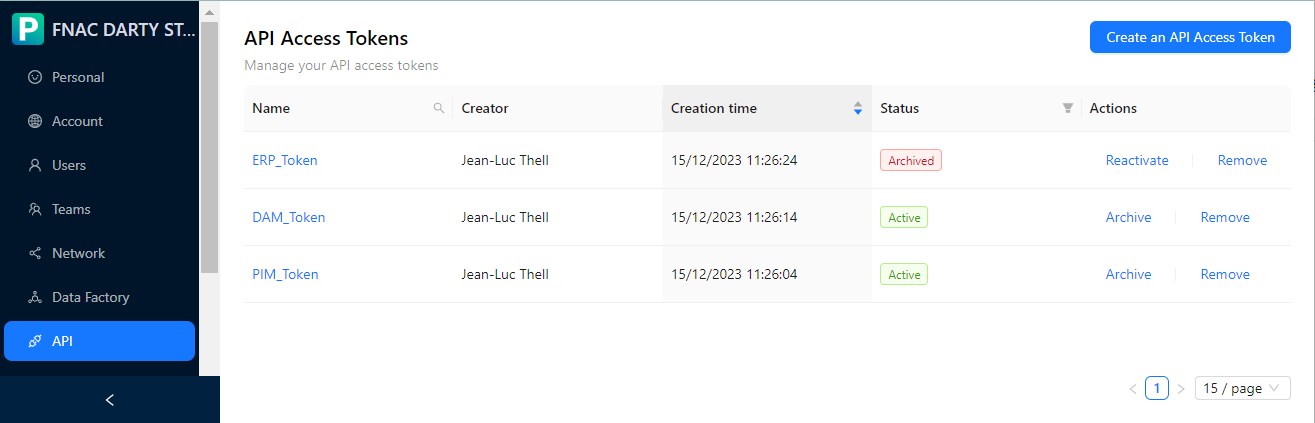
- An account can hold multiple API keys
- Each API key can be associated with a name
- A key can be archived and deleted, it is then no longer usable
Create API key
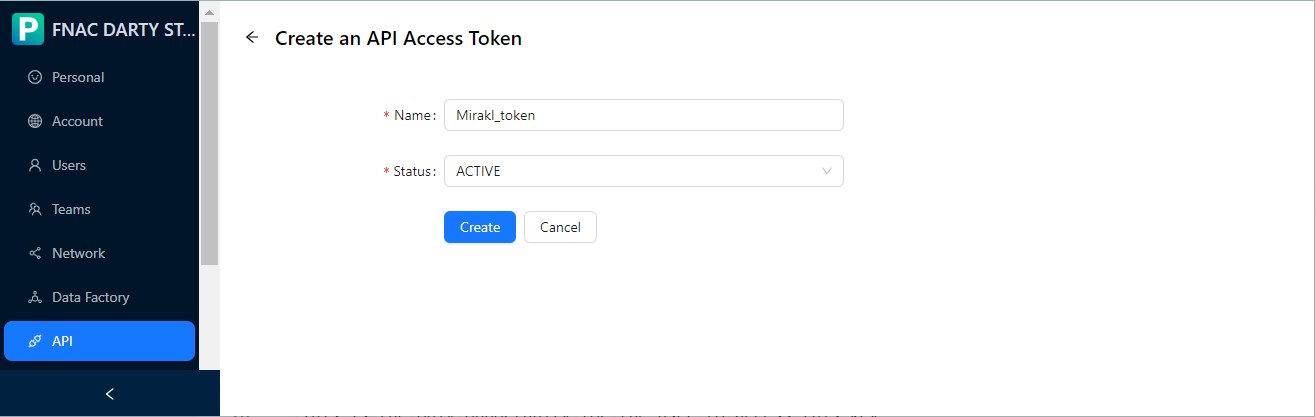
The user is redirected to the page listing the keys once the key has been created.
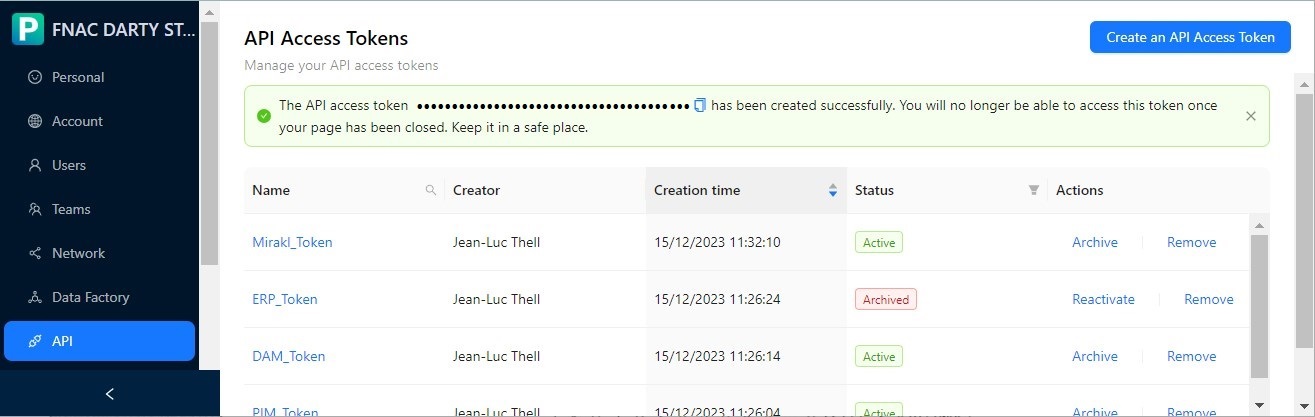
WARNING
- Once created, the API key is communicated to the user and this is the only opportunity for the user to access this key
Request authentication
To authenticate an API request, you should provide your API key in the HTTP X-Api-Key header. For example to simply fetch a job execution:
curl 'https://api.product-live.com/v1/data_factory/job_executions/[job execution id]' -H 'X-Api-Key: <token>'import axios from 'axios';
const jobExecutionId = '[job execution id]';
const apiKey = '<token>';
const url = `https://api.product-live.com/v1/data_factory/job_executions/${jobExecutionId}`;
axios.get(url, {
headers: {
'X-Api-Key': apiKey,
},
})
.then(response => {
// Handle the response here
console.log(response.data);
})
.catch(error => {
// Handle errors here
console.error(error);
});import { createConfiguration, ServerConfiguration, JobExecutionApi } from '@product-live/api-sdk';
export async function main(): Promise<void> {
const jobExecutionId = 'job execution id';
const configuration = createConfiguration({
baseServer: new ServerConfiguration(process.env.API_BASE_PATH || '', {}),
authMethods: {
ApiKeyAuthHeader: process.env.API_ACCESS_TOKEN
}
});
const jobExecutionApi = new JobExecutionApi(configuration);
const jobExecution = await jobExecutionApi.getJobExecutionById(jobExecutionId);
}package main
import (
"fmt"
"net/http"
"io/ioutil"
)
func main() {
url := "https://api.product-live.com/v1/data_factory/job_executions/[job execution id]"
token := "<token>"
req, err := http.NewRequest("GET", url, nil)
if err != nil {
fmt.Println("Error creating HTTP request:", err)
return
}
req.Header.Set("X-Api-Key", token)
client := &http.Client{}
resp, err := client.Do(req)
if err != nil {
fmt.Println("Error sending HTTP request:", err)
return
}
defer resp.Body.Close()
body, err := ioutil.ReadAll(resp.Body)
if err != nil {
fmt.Println("Error reading HTTP response:", err)
return
}
fmt.Println("Response Body:", string(body))
}const fetch = require('node-fetch');
const url = 'https://api.product-live.com/v1/data_factory/job_executions/[job execution id]';
const token = '<token>';
fetch(url, {
method: 'GET',
headers: {
'X-Api-Key': token
}
})
.then(response => response.json())
.then(data => {
// Process the response data
console.log(data);
})
.catch(error => {
// Handle any errors
console.error('Error:', error);
});import requests
url = 'https://api.product-live.com/v1/data_factory/job_executions/[job execution id]'
headers = {
'X-Api-Key': '<token>'
}
response = requests.get(url, headers=headers)
# Access the response data
data = response.json()import java.io.BufferedReader;
import java.io.IOException;
import java.io.InputStreamReader;
import java.net.HttpURLConnection;
import java.net.URL;
public class Main {
public static void main(String[] args) throws IOException {
String url = "https://api.product-live.com/v1/data_factory/job_executions/[job execution id]";
String apiKey = "<token>";
URL apiUrl = new URL(url);
HttpURLConnection connection = (HttpURLConnection) apiUrl.openConnection();
connection.setRequestMethod("GET");
connection.setRequestProperty("X-Api-Key", apiKey);
int responseCode = connection.getResponseCode();
if (responseCode == HttpURLConnection.HTTP_OK) {
BufferedReader in = new BufferedReader(new InputStreamReader(connection.getInputStream()));
String inputLine;
StringBuilder response = new StringBuilder();
while ((inputLine = in.readLine()) != null) {
response.append(inputLine);
}
in.close();
System.out.println(response.toString());
} else {
System.out.println("Request failed with response code: " + responseCode);
}
connection.disconnect();
}
}Note that it is also possible to pass the API key within the query string using the api_key parameter. For example:
curl 'https://api.product-live.com/v1/data_factory/job_executions/[job execution id]?api_key=<api_key>'